Paramiq vs Excel for Quoting
If your quoting lives in Excel and has started to break — formula errors, lost versions, no way to share — here is an honest comparison: what Excel still does better, what a parametric configurator does better, and how to tell which one you need.
Published · Last updated
Excel works for quoting until it does not. The formulas you wrote two years ago still calculate correctly — but you cannot hand them to a customer, you cannot put them on your website, and the moment someone else opens the workbook, half your lookups come back as errors. This page is an honest comparison rather than a pitch: Excel genuinely beats a configurator at some things, and we say which. Below are the five signs you have outgrown it, what carries over when you move, what changes, and the cases where you should stay exactly where you are.
Five signs you have outgrown Excel for quoting
Formulas break when someone else opens the file. You built it and you understand it. Then a colleague opens it on a different machine, the locale flips decimal separators, a named range nobody knew about gets overwritten, and the materials cost column starts multiplying by zero. In a spreadsheet a formula is a private agreement between you and a cell reference. Past one person, that agreement gets violated regularly.
You cannot share a quote without exporting it. A customer asks what happens at 2.4 m instead of 2.1. You change a cell, regenerate the PDF, email it. They ask about a different material. You do it again. Six rounds later you have spent two hours on what should have been one conversation. A configurator hands the customer the same calculator you use: they change the parameter, they see the number.
There is no audit trail when a number changes. A customer signed a quote six months ago and wants to reorder. You reopen the workbook, recalculate, and the total is different — but nothing tells you whether the labour rate moved, a material price was updated, or someone corrected a formula that was not actually wrong.
You cannot embed it. Every "request a quote" form emails you, you answer the next day with a PDF, and a share of those buyers has already gone elsewhere. The point of owning quoting maths is for it to run in front of the customer, not in your inbox at eleven at night.
Each new product line means rebuilding the same logic. Pergolas, fences and gates each get their own workbook, each with its own copy of the markup formula, each drifting slightly. Raise prices by eight percent and you update three files — and forget one. A parametric configurator separates the maths (one engine) from the catalogue (many products), so markup changes in one place.
Where each tool actually wins
The useful comparison is not tool against tool but task against task. Creating a quoting model and operating one are different jobs, and they do not have the same winner.
| Task | Excel | Paramiq | Faster today |
|---|---|---|---|
| Enter 20–100 parameters for the first time | Paste a range, fill down | One object per parameter | Excel |
| Build one complex formula | Formula bar, cell references | Named variables, live result | Paramiq |
| Find a typo in a variable name | Generic reference error | Names the unknown variable | Paramiq |
| Change 30 material codes at once | Paste a column | Edit item by item | Excel |
| See dozens of rows at a glance | Native grid | Card list per object | Excel |
| Recalculate for the next customer | Copy the file, edit cells | Change parameters, done | Paramiq |
| Let a salesperson quote without breaking maths | Protected sheets, fragile | They never see formulas | Paramiq |
| Produce a bill of materials from the same inputs | A second sheet to maintain | Computed from the same rules | Paramiq |
| Keep one version of the truth across a team | Copies multiply | One central model | Paramiq |
| Explore a rough idea with no structure | Total freedom | Decide the object type first | Excel |
What carries over
The real fear about replacing a spreadsheet is not the tool — it is losing the intellectual property inside it: years of accumulated formulas, the small markup adjustments, the waste factors you tuned by hand. What you give up is the fragility, not the logic.
- Your formulas stay yours — readable, editable, in language you can argue with, not buried in vendor code.
- Your markup logic stays in your control: margins, labour rates and regional adjustments are yours to change without a support ticket.
- Your price tiers stay yours. Materials carry base, retail and wholesale prices, and what a given role can see is controlled separately.
- Your line-item discipline stays. Every bill-of-materials row traces to a formula and every formula to a parameter, so you can still defend each number to a customer who asks.
What changes
Versioning replaces filenames. Every configuration is versioned, and a quote pins the exact version it was generated against — including a frozen copy of the bill of materials once it is sent. Reopen that quote later and you are looking at what the customer saw, not at what your current formulas would produce today.
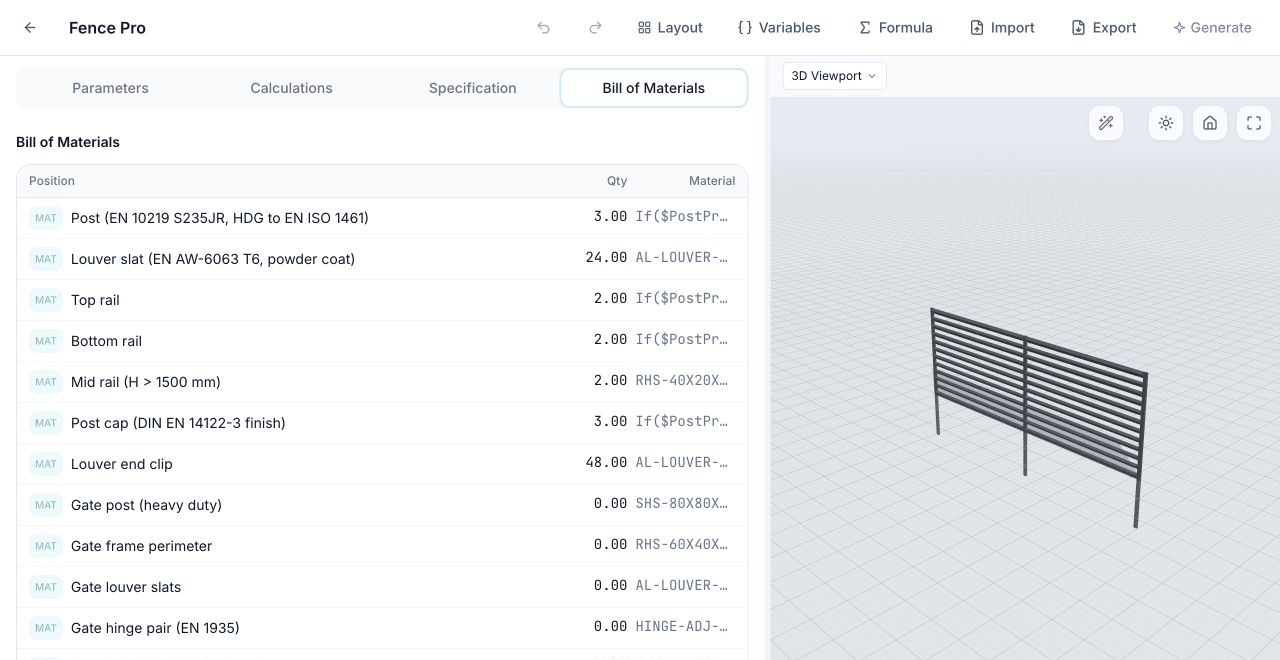
The same parameters that produce the price also produce the materials list, and, for dimensional products, the 3D view. They cannot drift apart, because none of them is maintained separately — all three are computed from one set of rules.
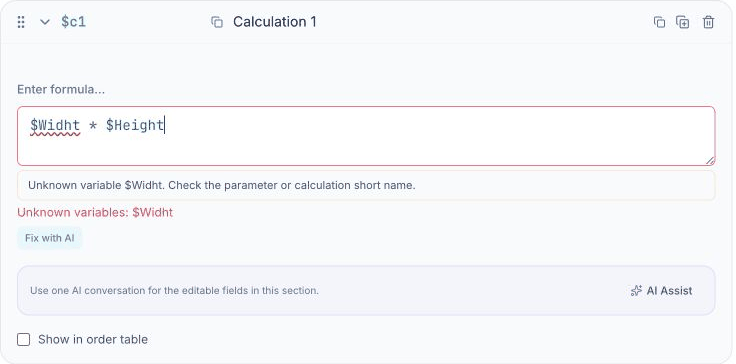
Diagnostics replace silent failure. A spreadsheet answers a mistyped reference with a generic error code and leaves you to find it. A named-variable engine can say which name is wrong and where.
And you can put the calculator in front of customers. A configuration can be shared as a link or embedded on your own site, with submissions arriving as structured data rather than free-text email you have to re-key.
Moving your existing spreadsheet
The most common objection is the reasonable one: years of work live in that file and nobody wants to retype it. You do not start from zero — Paramiq can read a workbook and draft a configuration from it, with parameters, calculations and specification items. Be clear about what that means, though, because it is the part most vendors overstate.
The import reconstructs your logic from the sheet rather than transferring formulas cell for cell. Spreadsheets store a cached result alongside each formula, and it is the values that travel most reliably, so the draft is an interpretation of your model that you then review against scenarios whose answers you already know. Macros are not carried across. Treat the import as a fast first draft that removes the blank page, not as a migration that is finished when it completes.
We are deliberate about this wording. Our own July 2026 audit of the import pipeline found that cached cell values take precedence over formula text, which is why we describe the result as a reviewed draft rather than a transfer.
When you should not move
Sometimes a spreadsheet is the right answer, and three cases stand out.
- You quote a handful of jobs a month and you are the only person who touches them. The switching cost does not pay back yet.
- Every quote is genuinely a one-off with no repeating pattern. Parametric tools earn their keep when there is structure under the customisation; with no pattern there is nothing to parameterise.
- You have no website or customer-facing surface. The largest single gain is putting the calculator in front of buyers, so without somewhere to put it you are taking half the value.
If one of those describes you, stay in Excel and spend the effort on discipline instead: named ranges, locked formula cells, one owner per file.
When you should move
- Recurring quote volume consumes time that should be spent selling or reviewing exceptions.
- A team shares the file and coordinating it has become its own job.
- Customer revisions require repeated manual recalculation and document export.
- You want a configure-it-yourself surface on your website.
- You are losing deals to competitors who answer with a number immediately.
- You are scaling — hiring estimators, adding regions, signing dealers — and the sheet will not survive contact with new hands.
Several of those signs justify mapping one representative product line and testing the workflow. They do not prove that a configurator will pay back for every manufacturer; that depends on quote volume, rule complexity, who is waiting on whom and which step the first version actually removes.
Where Paramiq fits — and where it does not
We are one of several parametric configurators and we are not the right answer for every workflow. The fit is good when the product is physical and configurable — fencing, pergolas, furniture, cabinetry, window and door systems, decking, sheds, signage — and when pricing depends on dimensions rather than only on dropdown options: post count derived from length and spacing, a waste factor that changes above a certain area, that kind of rule.
It is a poor fit for purely visual e-commerce customisation such as colour or monogram pickers, where specialist tools like Kickflip or Zakeke do the job better. It is not a CRM or a scheduling system — it is the quoting layer, and it sits alongside tools like Jobber or HubSpot rather than replacing them. And it is not enterprise CPQ with deep ERP integration; that category is a different scale of product and budget.
What moving actually takes
The variable that moves implementation effort most is how settled and testable the product rules already are. Scope the move around one representative line before estimating the catalogue as a whole.
- Choose one representative product line, one primary user and one primary output.
- Separate user inputs, calculations, product constraints and price or material data.
- Validate known-good, boundary and invalid configurations before adding more catalogue coverage.
- Add 3D and integrations where they remove ambiguity or re-keying, not simply because they are available.
Probably not, and it does not need to. Most teams keep spreadsheets for cost analysis, forecasting and internal reporting. What moves across is the quoting workflow specifically — the part where a configurable product becomes a number for a customer.
Yes. Each material can carry base, retail and wholesale prices, and which of them a person can see is governed by their role, so an estimator does not have to see everything a manager does.
It stays pinned to the configuration version it was generated against, and once sent it also keeps a frozen copy of its bill of materials. Later edits to your formulas or prices do not rewrite quotes that already went out.
Configurations export as JSON and Excel, and bills of materials export as CSV, Excel or PDF. Your logic and your numbers come with you.
Not for the configurator itself — building one is point-and-click, or an import you then tidy up. You would want a developer only to embed it into a custom site with custom styling, or to connect it to another system through a webhook.
Yes, and that is the point. The geometry is generated from the same parameters, so the picture cannot show one configuration while the price describes another.
The structure and the intent survive; the individual formulas are re-derived rather than copied, and macros are not carried over. Plan on reviewing the draft against scenarios whose answers you already know — the required effort depends on the workbook's structure, exceptions and available test cases.
If Excel is starting to limit a shared quoting workflow, bring one representative product and the result you need first. We will map the smallest useful configurator before discussing wider catalogue scope.